Configure Wi-Fi
This chapter and its sub-chapters apply only to devices that support Wi-Fi, i.e., devices with a DBW suffix in their Product Name.
If wireless functionality is restricted on the phone, Wi-i‑Fi and Bluetooth options are hidden from the phone screen, and you cannot configure or use Wi‑Fi or Bluetooth connections.
Only administrators can apply or remove this restriction. For details see Disable or Re-enable Wi-Fi and Bluetooth via Device Manager.
Network administrators can configure Wi-Fi parameters for the phone. The parameters are concealed from the user's view.
| ● | Users can enable or disable Wi-Fi using the phone screen. |
| ● | Wi-Fi cannot be enabled or disabled using SSH. |
| ● | The Wi-Fi connection is transparent to users. The phone decides which frequency is used, 2.4 GHz or 5 GHz; users cannot disable either. |
Network administrators can configure Wi-Fi settings in the phone screen.
Connect to an Available Wi-Fi Network
| ➢ | To connect to an available Wi-Fi network: |
Make sure to first disconnect your Ethernet cable. If the cable is connected, the device will not be able to connect to a Wi-Fi network.
| 1. | In the 'Wi-Fi' screen (Settings > Wi-Fi), turn on the Use Wi-Fi setting. |
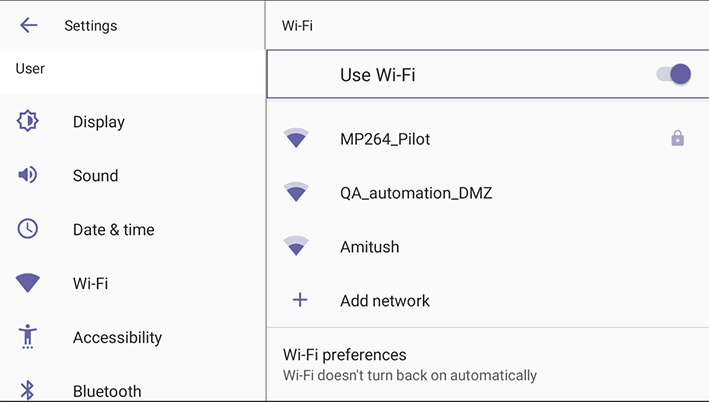
| 2. | View a list of available connections. |
| 3. |
|
| 4. | View the network you selected 'Connected'. |
Manually Connect to a Wi-Fi Network
| ➢ | To manually connect to a Wi-Fi network: |
Make sure to first disconnect your Ethernet cable. If the cable is connected, the device will not be able to connect to a Wi-Fi network.
| 1. | In the Wi-Fi screen (Settings > Wi-Fi), |
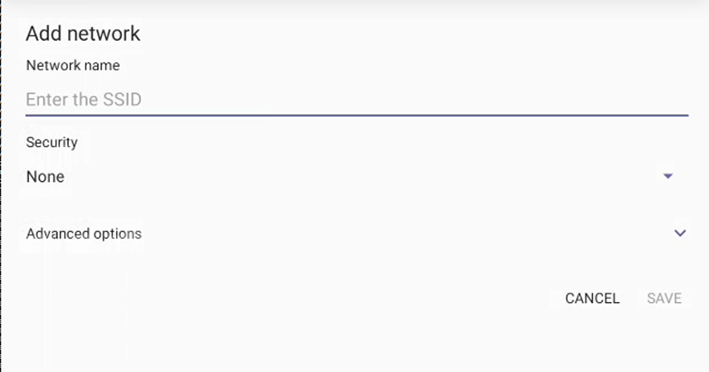
| 2. | From the 'Security' drop-down, |
| 3. | Optionally meter the selected network. Expand Advanced Options. Leave the setting at its default value of Detect automatically if you don't want to meter the network. |
Proxy and DHCP will automatically be configured by the network.
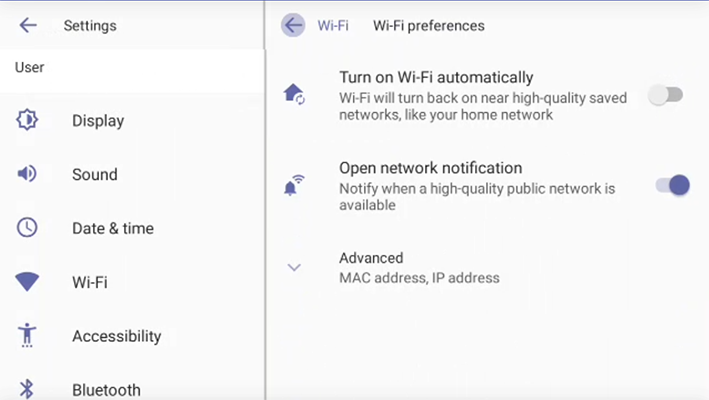
Enabling the setting Turn on Wi-Fi automatically shown in the 'Wi-Fi preference' shown below allows the device to automatically connect in the future to the highest signal-quality network remembered by the device.
Set up via Configuration File
As an alternative to manually configuring Wi-Fi settings via the phone's user interface as shown above, you can configure the Wi-Fi settings described in the next table, using the Configuration File.
Configuration File Wi-Fi Settings
|
Wi-Fi Setting |
Description |
|---|---|
|
network/wireless/adavanced_options/dns1 |
Defines the IP of the wireless DNS1. |
|
network/wireless/adavanced_options/dns2 |
Defines the IP of the wireless DNS2. |
|
network/wireless/adavanced_options/gateway |
Defines the IP address of the wireless gateway |
|
network/wireless/adavanced_options/hidden_network |
Defines the name of the wireless hidden network. See also here. |
|
network/wireless/adavanced_options/ip_addr |
Defines the IP address of the static Wi-Fi network if you’re operating with a static Wi-Fi network. |
|
network/wireless/adavanced_options/ip_settings |
Used to define DHCP. |
|
network/wireless/adavanced_options/network_prefix_length |
Defines the network prefix length to be used. |
|
network/wireless/adavanced_options/proxy |
Defines the proxy wireless server source. |
|
network/wireless/adavanced_options/proxy/auto_config/pac_url |
Defines the URL of the PAC file. |
|
network/wireless/adavanced_options/proxy/manual/exclusion_list |
Defines the list of IP addresses that will be blocked. |
|
network/wireless/adavanced_options/proxy/manual/proxy_hostname |
Defines the name of the proxy host. |
|
network/wireless/adavanced_options/proxy/manual/proxy_port |
Defines the proxy port. |
|
network/wireless/advanced_options/hidden_network |
Defines whether the network name should be hidden (see Configure Wi-Fi with Hidden SSID). |
|
network/wireless/anon_identity |
Defines the anonymous wireless users who won’t be seen. |
|
network/wireless/ca_cert |
Defines which CA certificate to use. |
|
network/wireless/client_cert |
Defines which client certificate to use. |
|
network/wireless/domain |
Defines the domain name. |
|
network/wireless/eap_method |
Defines the EAP method. |
|
network/wireless/identity |
Defines the identity of the user. |
|
network/wireless/password |
Defines the password of the network. |
|
network/wireless/phase2_method |
Defines the encryption method. Phase 2 applies only to the 802.1x EAP method. Valid values: NONE, MSCHAPV2, GTC,PAP, or MSCHAP. |
|
network/wireless/security |
Defines the security method (encryption protocol). |
|
network/wireless/ssid |
Defines the SSID of the network. |